Why do I Need to use a Hub When Communicating With the Instrument via Ethernet?
To avoid the noise and communication disruptions, it is our recommendation to the customer to use a HUB when communicating to the instrument via Ethernet. The HUB will provide a very strong GND connection and eliminate most of the noise problems. HUBs are designed to provide a reliable and high quality communication/data transfer connection over an Ethernet at high speeds.
In the US, most AC adaptors for PC and PC power connections are 3-pin, and have a GND connection. If the PC and the instrument are both well grounded, then there is no problem in using a cross-over cable to connect directly to our instrument. Since we don't know if there is a good GND connection in the customer's PC, we generally recommend using a HUB when connecting to the instrument via Ethernet.
Related Products & Solutions

DL7440/DL7480 Digital Oscilloscopes
8-channel 500 MHz oscilloscope with 16 logic inputs, for applications where four channels aren't enough. Support for eight analog channels, 16 bits with 250MHz logic bandwidth, 16MP of recording memory, power analysis, serial bus analysis, and a broad selection of voltage and current probes.

DL9000 DSO Series
500MHz, 1.0GHz, and 1.5GHz DSOs for debug and high performance applications. 10th
generation oscilloscope from Yokogawa with industry leading 2.5 million wfms/sec and lowest dead time. Winner of Test & Measurement World's "Best in Test" award.

DLM2000 Mixed Signal Oscilloscopes
200, 350, and 500MHz mixed-signal oscilloscopes for every engineer. Best-in-class performance in usability, acquisition, analysis, and display—all at a price you can digest. Options include serial bus, vehicle bus, and power supply analysis functions.

DLM6000 MSO & DSO Series
500MHz, 1.0GHz, and 1.5GHz DSO and MSO models for debug, waveform characterization, bench top, or automated test applications. 4 channel models with 16 or 32 logic inputs. 12th generation oscilloscope with ergonomic physical and on-screen improvements.

GS200 DC Voltage / Current Source
The GS200 is a low voltage/current DC source with high accuracy, high stability, and high resolution.

GS610 Source Measure Unit
The GS610 is made up of a programmable current and voltage source, a voltmeter, and an ammeter. Each function can be combined into numerous operation modes.

GS820 Multi Channel Source Measure Unit
- Yokogawa source measure unit GS820
- Precision SMU quick response for automated testing
- High-speed communication improves productivity
- Customizable to enable any test

Precision Power Analyzer WT3000
With 0.02% accuracy and 1MHz bandwidth, the WT3000 delivers where the highest precision measurements are required. It is the industry standard for R&D work on inverters, motor drives, lighting systems and electronic ballasts, UPS systems, aircraft power, transformer testing, and other power conversion devices.
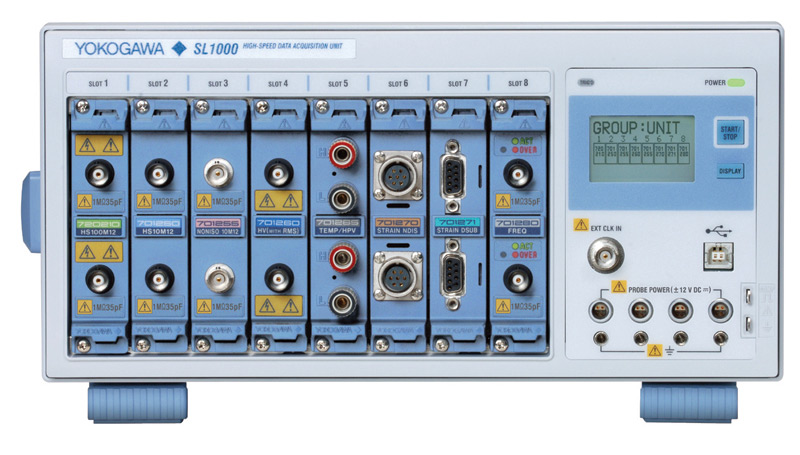
SL1000 High Channel Count ScopeCorder
A headless ScopeCorder system capable of connecting multiple chassis into one PC-based system.

WE7000 PC-Based Measurement Instruments
One system, multiple instruments: WE7000 satisfies demands for fast, reliable and precise data acquisition which uses a standard laptop or PC as its user interface. Input modules plug into an expandable measuring station. Via the optical interface, it is possible to galvanically isolate the laptop/PC.

WT1600 Digital Power Meter
The High-end WT1600 is designed for a wide range of applications, from energy-saving to large load applications. The WT1600 has a six element input capability to provide maximum flexibility, and Basic Power Accuracy of 0.1% with 1 MHz Bandwidth.

WT1800 High Performance Power Analyzer
The WT1800 Power Analyzer offers maximum flexibility with up to six wattmeter elements, high bandwidths, simultaneous high speed digitizing, and wide voltage and current ranges. Although this model is still available, the newer WT1800E offers higher accuracy.

WT500 - Mid Range
- Power and Harmonic (THD) Measurements with Independent Range Controls
- Efficiency measurements of AC/DC or DC/AC Inverters & Motors

Data Acquisition (DAQ)
Yokogawa data acquisition systems give you the most flexibility and power to measure, display, store, and even actuate any number of physical or electrical phenomena.

High Speed Data Acquisition
- Yokogawa high-speed data acquisition systems
- Industry-leading isolation, bit resolution, sampling rate, and memory depth
- Independent channel hardware and easy to use software

Low Speed DAQ & Industrial Recorders
Yokogawa’s performance-leading data acquisition and logging systems, plus a wide range of paper and paperless recorders, meet all your recording needs. Universal inputs accept voltage, thermocouple and RTD signals, and offer maximum flexibility over recording span and unit scaling.

Mixed Signal Oscilloscopes
- Yokogawa mixed signal oscilloscopes
- Simultaneous, time correlated observations
- Analysis of analog with digital (logic) signals
- Troubleshooting electrical anomalies, measuring parametric values, monitoring signals

Oscilloscopes
- Digital oscilloscopes
- High-speed sampling
- Range of bandwidths for electronic device design and development
- Advantages of oscilloscope and multi-channel data recorder

Power Analyzers and Power Meters
Yokogawa, the world's largest manufacturer of energy and power analyzers and meters, provides a broad choice of digital power analyzers to satisfy all requirements.

ScopeCorders
- Flexible, high-performance Yokogawa ScopeCorder
- Modular platform combines mixed signal oscilloscope and portable data acquisition recorder
- Captures high-speed transients and low-speed trends

Signal Generators, Sources and Supplies
For general purpose standalone applications or as core components in a high speed test and measurement system, Yokogawa sources and signal generators are highly accurate and functional.

Source Measure Units
A Source Measurement Unit (SMU) is a flexible test instrument which is capable of both sourcing and measuring voltage and/or current at the same time.
