WTViewer for WT210/WT230 (FREE)
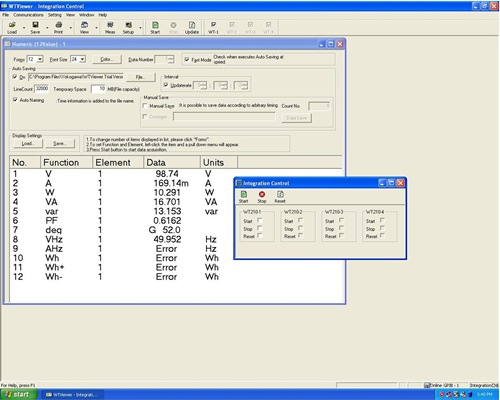
WTViewer for the WT210/WT230 is a software application that allows you to load numeric and waveform data measured with the WT210 or WT230 Digital Power Meter to a PC via GP-IB or serial (RS-232-C) communications. It lets you view the measured data then save it to hard disk. Using GP-IB allows you to connect up to four WT210s or WT230s simultaneously.
Numeric Data
| WTViewer can display the voltage, current, power, and phase of the measured data simultaneously. It can display up to 250 data items on the screen at once. |  |
Waveform*
| WTViewer lets you monitor voltage and current waveforms on your PC screen. The waveform display function lets you check the voltage and current phase angle, waveform distortion, and peak shapes. |  |
*The optional harmonic analysis function (/HRM) is required to the main unit (WT210/WT230) for waveform display and harmonic measurement.
Harmonic Measurement*
| With WTViewer, you can numerically or graphically display the results of measured harmonics of voltage, current, power, and phase harmonics up to the 50th order. |  |
Trend
| Various types of measured data can be displayed in a trend graph. You can survey chronological changes in such phenomenon as the variations in the supply voltage and current consumption. Harmonic trends can also be displayed. |  |
Settings up WT210/WT230 from Your PC
| You can enter WT210/WT230 settings such as the wiring method, range, filters, and scaling from your PC. These settings can be saved on the PC then loaded back in all atonce when needed. |  |
Converting Data to CSV
| Waveform and numeric data can be saved on the PC. From the PC you can create .wtd files that can be loaded by WTViewer for WT210/WT230, or .csv files that can be imported into Excel. |
 |
| Functions | |
| Measuring Mode | Normal, harmonics, integration |
| Types of Files | Waveform, calculated values, harmonics, settings |
| Display Screens | Numerical, waveform*, trend, harmonic Bar Graph* * Harmonic option is required on WT210/WT230. |
Data Acquisition Interval |
100 ms at max. speed. - In Normal mode, using GP-IB. - Depends on your PC's performance. - In Fast mode when using the WT230 (restrictions apply) * When the WT210/WT230 data update rate is one second or more, measurement, acquisition, and saving can be synchronized. |
| System Requirements | |||
| Personal Computer | CPU | Premium4 1.5 GHz or higher (recommended) | |
| Memory | 1 GB or more (recommended) | ||
| Hard Disk | 500 MB or more of free space | ||
| OS | Microsoft Windows XP, Windows Vista, or Windows 7 (All English versions) | ||
| Communications Port | GP-IB: NI (National Instruments) AT-GPIB, PCI-GPIB, PCI-GPIB+, PCMCIAGPIB, PCMCIA-GPIB+, or PCIe-GPIB with driver NI-488.2 version 1.60 or later (however, version 2.3 is not supported) | ||
| RS-232: An available COM port on the PC | |||
| Display | Screen resolution: 1024 x 768 pixels or higher | ||
| Printer and Mouse | Must be compatible with the operating systems listed above. | ||
| List of Functions | ||
| Display | Numeric Data Display | Available |
| Waveform Display | Available | |
| Trend Display | Available | |
| Harmonic Bar Display | Available | |
| Vector Graph Display Function | N.A. | |
| X-Y Display | N.A. | |
| Display | From the PC | Available |
| Types of Files | Conversion to CSV | Available |
| Display Screens | GP-IB* | Available |
| Data Acquisition Interval | Serial (RS-232-C) | Available |
* 1. When using GP-IB, up to four units can be connected. However, all
connected instruments must be same model (all WT210 or all WT230), and
have the same options. When multiple power meters are connected, you
must set each unit to the same display update rate (display updating can not
be synchronized.)
| This software is for use with the WT210 and WT230. It does not support other instruments in the WT series. |
Windows and EXCEL are registered trademarks of Microsoft Corporation in
the USA. Other companies and product names are trademarks or registered
of their respective holders.